




Disclaimer: I received a free sample from Audinst, and they are also a site sponsor.
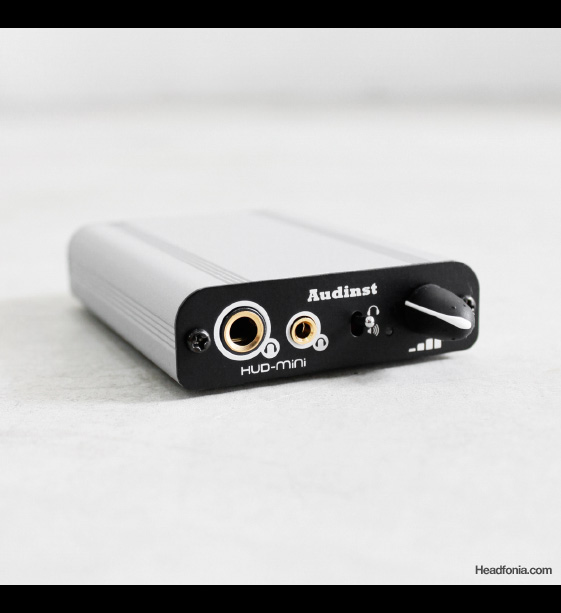
I wasn’t aware that Audinst was working on a newer replacement product for the HUD-MX1, but the moment that I received an email from Audinst about the HUD-Mini, I was very excited because I expected to see an upgrade to the HUD-MX1 (which by now have been in the market for two years). The HUD-MX1 gave us an affordable yet solid performing entry level USB DAC, and I had this expectation that the newer and better looking Audinst HUD-Mini was going to top that.
Initial Impressions
As I received the product in my hand, my impressions were quite positive. The enclosure design has improved over the HUD-MX1, and is also slimmer and smaller compared to the predecessor. Even though the smaller form factor isn’t going to be a big deal once you put it on your work desk (where you’ll be using it with your laptop), it was enough of a design change to make it look like a more modern product. Aside from the lack of the DC power input (which I never use on the MX-1, anyway), the HUD-Mini was mostly the same front and back. Up till that point, I wasn’t even aware of the price that Audinst was going to charge for the Mini. I simply thought that given the better looking, and the sound (which I thought would surpass the MX1), they can charge a higher price and it would still be a good value.
I was so surprised when I started to listen to the HUD-Mini. I didn’t understand the sound that Audinst was trying to create here. It had a good bass, but nothing else. The sense of space was non existant, the midrange very congested, the sound extremely grainy. Immediately I was disappointed. Not only did the Mini fall short of the MX1, but I would even choose the Fiio E10 over this. I tried listening to it for a few days, and still my impressions were the same. There is no way I can recommend something that sounds like this.
Op-Amp Change
I don’t remember what happened next, perhaps I was flipping around the manual and discovered the fact that the op-amp is replaceable, or perhaps I was taking internal shots of it when I discovered a socketed op-amp, but what follows is that I suddenly found myself listening to the HUD-Mini with an OPA2227 and being very pleased with the sound. Gone is that grainy, congested sound, replaced with a much grander sound with a clear and full mids and a very nice soundstage depth. I listened to the Mini with this set-up for a week or more, and I’m still convinced that the Mini is now an entirely different product.
This is the second time that I’ve chosen the OPA2227 over the stock op-amp from the manufacturer. No, I don’t think that the OPA2227 is the perfect answer for everything. It’s just that in this case, that’s the only op-amp I happen to have available. Somehow I have misplaced my box of op-amps with the super-nice 2111KP and other popular options like the OPA627 and AD797, so the only op-amp that I can use is the OPA2227 which I simply pulled from JDSLabs’ CmoyBB. And while the stock LME49860 worked really well with the HUD-MX1, it simply sucks on the HUD-Mini, and don’t ask me why that is. What I’m saying is that the HUD-Mini, currently priced at $129, is quickly becoming my new recommendation for an entry level USB DAC/Amp in this price range, even besting the HUD-MX1 and the Fiio E17, as long as you are using the OPA2227. Another op-amp that I happen to have around is the MUSES 8820 (from the Audinst AMP-HP portable amp), which I believe is a more rare op-amp and perhaps also more expensive than the OPA2227. The MUSES 8820 is a better technical op-amp with a stronger low bass performance, more spacious sound, cleaner and blacker background, and overall more laid back than the OPA2227. I still think that the OPA2227 with the fuller mids down to the midbass is the better all rounder, but if you want to give the MUSES a try, it’s also an upgrade from the stock LME49860.
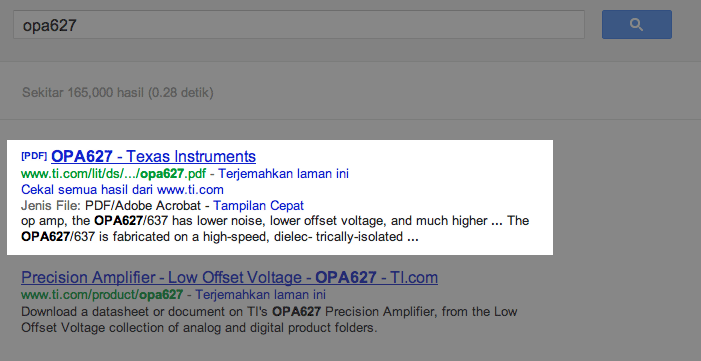
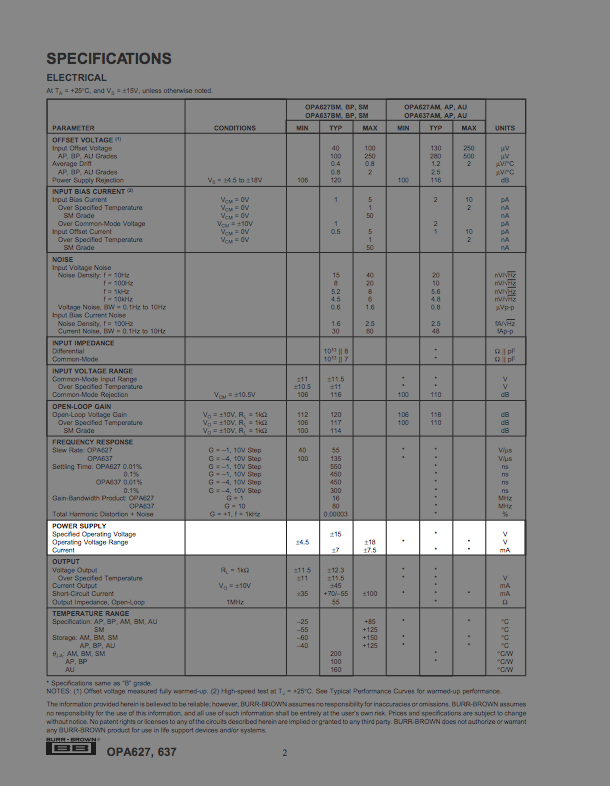
The bottom line is that you can try rolling other opamps and perhaps you’ll find a better combination. The only thing that you need to know is to get an op-amp that can accomodate a 9V supply voltage. How to find out: Google the op-amp code (i.e OPA627), open the datasheet document which usually comes in a .PDF format. On the specifications page, locate the power-supply voltage range (in the case of the OPA627 it’s a ±4.5V to ±18V, so you’re good.
Continue to the next page…




William Lim
Great! Waiting for my Mini and if the OPA2227 don’t do it, I may try a MUSES 🙂
Ken Stuart
So what about the HUD-Mini with OPA2227 versus the Headstreamer ?
Mike
Of course, I absolutely missed that comparison.
The Headstreamer is very good with pushing out the details, but the sound is a bit flat and is not as natural as the HUD-Mini with the OPA2227. Instrument definition, three dimensionality is better with the Audinst.
quadpatch
Cool review Mike! I’m going to be reviewing this one soon so am really interested to start playing with op-amps now. Is there nothing else I need to know about them other than the voltage? When I looked at some to buy there were multiple types with all kinds of letters after the OPA2227 (no straight OPA227 models) and some of the pictures look like different shapes.
tero.molander
You need OPA2227P (DIP8 package version). You can ignore other letters after the important “P”. DO NOT BUY OPA227 (which is single opamp vs. dual which you need – you’ll blow that up or damage your HUD-mini, voltage pins are different) or OPA2227U (SOIC8 package).
Nick Tam
OPA2227PA specifically actually. The 2227P has higher DC specs which doesn’t apply to audio applications, and saves you half the cost, won’t stop you from getting it though. You can use other versions provided you have a DIP adapter
Nick Tam
Furthermore the “2” in front of the 227 denotes that it is dual channel. you should always google up the datasheets on whatever OPAMP you’re planning on getting. The 8-pin DIP package is always protruding pins and are not designed to be soldered on.
quadpatch
Thank you for the info too Nick, looks like I have lots to learn.
quadpatch
Thanks very much for the info tero.molander, that’s really helpful! I will get one of these an maybe some others soon :).
Mike
What Tero.molander said. What you need is an OPA2227P in a DIP-8 package version. That’s the one that’ll fit the HUD-Mini socket.
quadpatch
Thanks Mike :).
Mike
Here is a good picture for a reference:
http://www.headfonia.com/wp-content/uploads/2010/08/matrix_mstage_mod02.jpg
Michael Julius
Ugh! Tough call, my E10 is breaking and I’ve been looking for a new Dac that will be used with my Bottlehead Crack/Philips Fidelio L1 and M1, and the JVC DX1000. I really enjoy bass control, but I am not sure if I should pull the trigger on this or the original Mx1.
Ken Stuart
Mike has already mentioned that he prefers the HRT MusicStreamerII to the original MX1, especially if you already have an amp.
Mike
Thanks for sharing your impressions, William.
Francesco Zannoni
Hi guys, I followed Mike’s suggestion and I noticed that the quality really improves. I use the mini as DAC and an Asgard as amp to drive my Beyerdynamic 990 pro. I noticed that with the OPA 2227P it loses more or less 20% of power. I have to move the volume knob from 12 to 3 position to listen at the same level. As Mike I used the op amp that comes with JDlabs Cmoy and so I tried to install the op amp that comes with mini (LME49860) inside the Cmoy. The sound quality drops but the output power increase a lot. Maybe this could be the reason for which Audinst doesn’t want to use OPA 2227 op amp.
Thanks Mike for the suggestions (include the Asgard one :))
Mike
You’re welcome, Francesco 🙂
George Lai
The iPhone 5’s new lightning dock connector is apparently all digital, Mike, so now there’s no need for manufacturers to pay Apple to get that digital data out. So we should see a whole slew of standalone DACs for the iPhone 5 with Lightning on one end and a 3.5mm jack on the other, as well as Fiio-priced products like the Fostex HP-P1 🙂
Mike
That’s awesome, George
George Lai
And hopefully Headfonia will be the first to review one. I’m getting my iPhone 5 next Friday
Nick Tam
It seems like all that talk about getting good music from a phone was just yesterday… just so that you know, I was always fine with an iMod or the Samsung SI and SIII with Wolfson equipped DACs, no need to pay big $$$ for a CLAS device really, sometimes I can’t believe people spend all that for the royalties and the big markups on price of the branding :
And now I hardly care about mobile sources anymore.
I just like my Sansa Clip with Rockbox on it 🙂
Nick Tam
Oh and bear in mind, buying a DAC is an absolute necessity for the bare-bones audiophile since there’s no analogue out
Unless you’re planning on using the headphone out…
Mike
No analog out!
Nick Tam
me typo fail. xD
George Lai
Apple Stores have just been updated to show that the Lightning to 30 pin adapter does have analog audio out. FYI
Mike
Thanks, George.
Mike
I’m not going to be the first George, I can tell you that. Either I have to go buy a black market unit or wait ~6mths+ before the launch here in Indonesia.
And I’ve never been quite enthusiastic about spending $800-$900 on an Iphone in the past(that’s what they retail for in here). Though they are nice phones.
Eugen
Android now has USB dac support.
Pascal Studer
I saw on ebay that Audinst now sells the mini in a set with the OPA2228.
Is this the same as OPA2227 probably.
Would this be a good amp to drive my Senns HD 25-1 and HD 650?
I have the Fiio E10 now.
Mike
That looks like a better version of the OPA2227
http://www.ti.com/product/opa2228
Should be good with the HD25-1, maybe not the best with the HD650.
Pascal Studer
Thank you Mike. So would the Audinst MX1 be better for my Senns or the Fiio E17? Or just stick with the Fiio E10 for the HD 25-1 and connect it with a Schiit Asgard for the HD 650? Because of your site I purchased these two Senns 🙂 Keep up the good work. Thanks
Celvar
I’m looking for an alternative to the very, very, (very) underwhelming
FiiO E17 (good aspects but so clearly lacking and not cheap at all), and
this seems a good find…
Soap
Hi, Mike! Thanks for your recommendation! I just changed the original op-amp in Hud-Mini with the MUSES 8820. I think the new op-amp does improve the sound quality considerably, by giving bigger soundstage, more details, more airy and more bass as well.
So I think it works superb on my HD598. But in the meantime, my Philips X1 seems to become “warmer” and hence lose some clarity (is it the right word?), could that because the Muses op-amp adds bigger bass to the already basshead X1?
Quite interestingly, I think HD598 sounds a bit cleaner and clearer than X1. Some said it was because HD598 had a more forward mid. Is it true?
Thanks again!
Mike
Good to hear that.. I think the impression of losing clarity and becoming warmer may be due the lesser treble quantity? I don’t’ think that a warmer sound causes lost clarity.
The HD598, I think the driver is extremely good and is more transparent than the X1. It’s just that the mid-centric tonality is quite limited.
Pantheon
Hi,the fiio e17 sound’s quality is so badly than the hud mini with op2227??thanks a lot i’m undecided with these two amp
Thanks for the review!
Bob Travoy
hello, great review